

Online Render Farm Service
Render smarter,not harder.
RenderSonic is an online render farm service that sits quietly in your system tray and turns your local Blender, Maya, 3ds Max, KeyShot or Cinema 4D scene into a cloud render job - no manual packaging, no uploading assets by hand, no forgetting a texture.
- 5
- 3D software & render engine integrations
- 4K
- 4K & custom resolutions
- 0
- Manual asset packaging required
3D Software
One render farm service, every engine you already use
RenderSonic is a render farm service built around the software you already use - pick your application, see the render engines it supports, and submit straight from your scene.










Features
Every step of cloud rendering, automated
RenderSonic removes the manual overhead between your workstation and the render farm - so submitting to our online cloud render service feels the same as hitting render locally.
One-click plugin install
RenderSonic auto-detects the 3D apps on your machine and installs the matching submission plugin in one click - no manual copying of files into plugin folders.
Native submission menus
Submit straight from Blender, Maya, 3ds Max, KeyShot or Cinema 4D. RenderSonic reads your active scene and render settings automatically.
Automatic asset sync
Local textures, references and linked files are detected and synced to the cloud node before the job starts - nothing gets left behind.
Live frame-by-frame progress
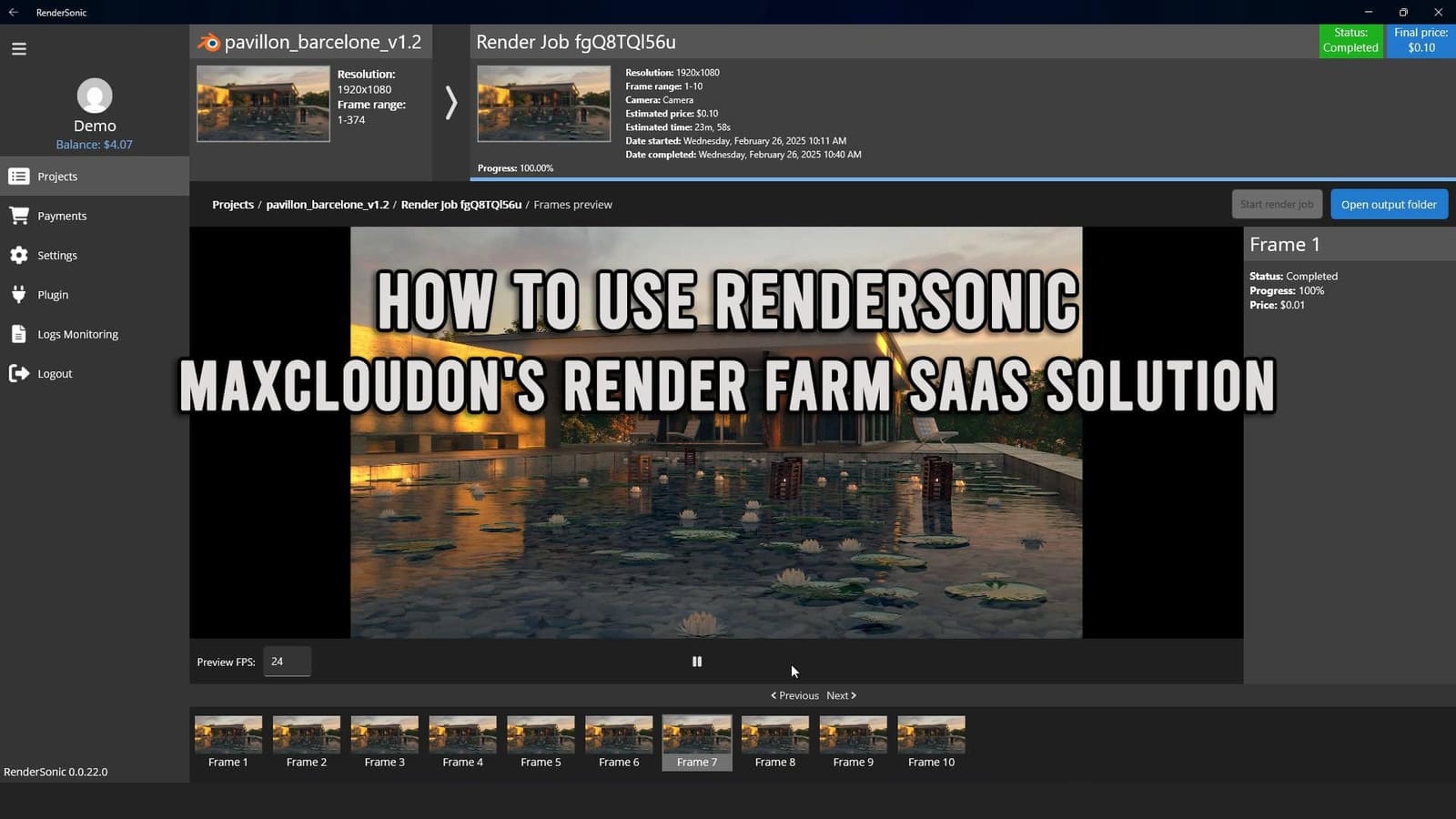
Watch every frame move from queued to rendering to delivered in real time, with an upfront cost and time estimate before you commit.
In-app re-render & upscale
Not happy with a frame? Re-render it directly from the app with 4K and custom resolution presets, without touching your original scene file.
Tray-first, file-explorer native
RenderSonic runs quietly in the system tray and delivers finished frames straight back into the local folder you already work from.
Workflow
From timeline to delivered frames, in five steps
- 01
Configure once
Point RenderSonic at your local project path and let it auto-install plugins for the 3D apps you use.
- 02
Submit from your scene
Hit render from inside Blender, Maya, 3ds Max, KeyShot or Cinema 4D - same workflow, just a cloud target.
- 03
Review the estimate
See upfront cost and time before you commit. No surprises on the invoice.
- 04
Monitor live
Track every frame as it queues, renders and completes, with progress and spend visible in real time.
- 05
Get files automatically
Finished frames land back in your local output folder the moment they're done - nothing to download by hand.
Demo
See RenderSonic in action
A step-by-step walkthrough of submitting a render, tracking progress and getting your frames back - watch it before you install.
Comparison
RenderSonic vs. Dedicated Cloud Servers
Both run on the same cloud infrastructure. RenderSonic optimizes for speed of setup and simplicity; Dedicated Servers optimize for full control over a custom pipeline.
| RenderSonic | Dedicated Servers | |
|---|---|---|
| Setup time | Minutes - install & submit | Manual server configuration |
| Billing model | Pay per rendered frame | Hourly / reserved server time |
| Admin access | Not required | Full remote desktop control |
| Custom pipelines & plugins | Standard 3D app integrations | Install anything you need |
| Best for | Regular renders in supported apps | Custom or non-standard pipelines |
Trust & security
Your scene files stay yours
Studios hand us proprietary assets every day. Here's what happens to them - and what doesn't.
- 1,200+
- Render nodes online
- 48k+
- Jobs completed to date
- < 15 min
- Median support response
- 99.9%
- Platform uptime
Encrypted in transit
Every upload and download runs over an encrypted connection between your workstation and the render node.
Auto-deleted after your job
Scene files and outputs are automatically purged from render nodes after a fixed retention window - nothing lingers.
NDA available on request
Working on an unreleased project? We'll sign your NDA before your first job runs.
Try it on your own scene
$15
Free render credit for new accounts.
What studios are saying
"We went from a render queue that ate our evenings to submitting a job and getting coffee. It's the first cloud render tool our whole team actually likes using."
Priya Kapoor
Lead Artist, Northshore Studio
"Setup took less time than writing the email asking IT to set up a render node. Frame delivery back into our project folder is the part that sold us."
Marcus Ohene
Freelance ArchViz Artist
"The upfront cost estimate before every job means finance stopped asking us to justify cloud render spend after the fact."
Elin Sørensen
Production Manager, Kettle & Co.
Pricing
Pay per frame. Nothing to reserve.
RenderSonic bills by the rendered frame, not by the hour of server time. Estimate the cost before you submit, watch it tick up frame by frame, and only pay for what actually renders.
- Pay only for frames you actually render
- No extra charge for data transfer
- Encrypted transfer
- auto-deleted after retention window
- Unlimited seats on one account
Output presets
FAQ
Common questions
Can't find what you're looking for? Reach out and we'll get back to you.
What is a render farm service?
A render farm service is a cloud-based network of render nodes that takes 3D rendering off your local workstation. RenderSonic is an online render farm service built for artists - submit a job from Blender, 3ds Max, Maya, KeyShot or Cinema 4D and get your frames back automatically, without renting or managing servers yourself.
What are the system requirements?
RenderSonic runs on Windows 10 or 11 with an active internet connection. No dedicated GPU is required locally - the heavy lifting happens on the cloud render nodes.
Which apps and render engines are supported?
Blender 3.0+, 3ds Max, Maya and KeyShot are fully supported today, with Cinema 4D in active development. Supported render engines include V-Ray, Arnold, Corona, Cycles and Eevee.
Can multiple people submit from the same account?
Yes. A single RenderSonic account supports multiple user seats, so a whole team can submit jobs and monitor progress independently.
Are there extra charges for data transfer?
No. Uploading your scene and assets, and downloading finished frames back to your workstation, is included - you're only billed per rendered frame.
What happens to my files after the job finishes?
All data is transferred over an encrypted connection and automatically deleted from the render nodes after a fixed retention window.
What if I need a custom software pipeline?
RenderSonic is built around standard 3D app integrations. If you need full control over installed software or a non-standard pipeline, Dedicated Cloud Servers give you complete admin access instead.
Get started
Ready to render smarter?
Install RenderSonic, connect your favorite 3D app, and submit your first job to our render farm service in under five minutes.